
Your Stratux has a built-in web page that tells you in about a minute whether it’s working. Join the Stratux Wi-Fi network, then type http://192.168.10.1 into your browser’s address bar. The first screen is the Status page.
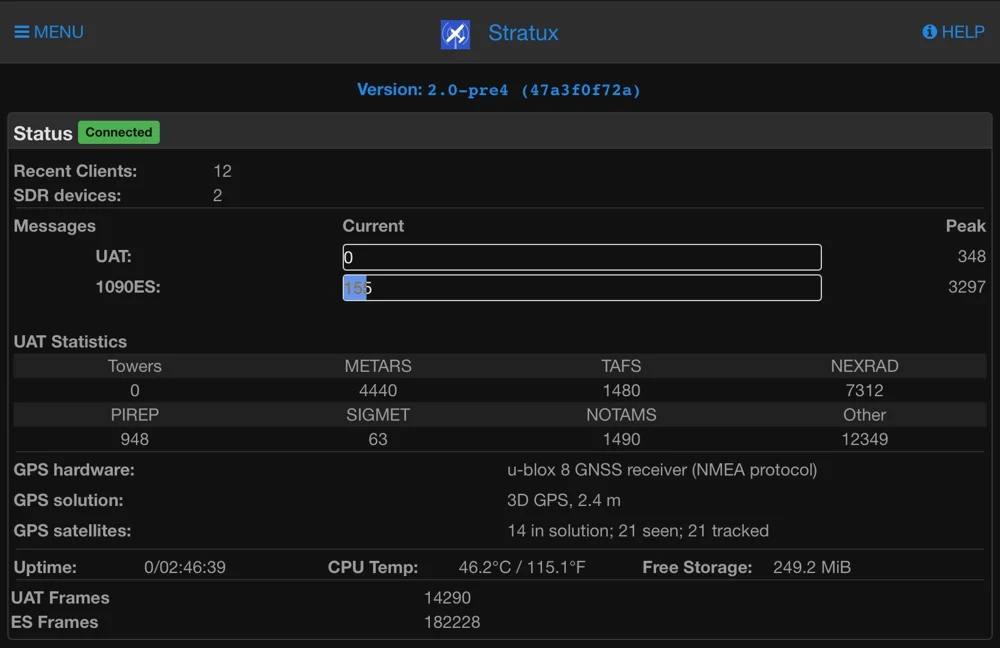
A healthy Stratux v2.0 status page on an iPad, on the ground with no tower in range. Screenshot: Ben9096 (Stratux Discord).
What each line should show
| Line | Healthy | If it doesn’t look like that |
|---|---|---|
| Version | 2.0 or later is the current release | v1.6r1 is the older software. Update it in about ten minutes. |
| Status | Green Connected | Refresh the page. If it won’t reconnect, rejoin the Stratux Wi-Fi. |
| SDR devices | 2. A Crew Dog Stratux has one radio for 978 MHz and one for 1090 MHz | 1 or 0 means a radio isn’t being detected. Check the troubleshooting guide or contact us. |
| Messages: UAT and 1090ES | Counts that climb as data arrives. Peak is the highest so far. UAT often reads 0 on the ground. | 1090ES stuck at 0 in the air with traffic around points to an antenna or radio. Check that both antennas are on, then contact us. |
| UAT Statistics | Towers, METARs, TAFs, NEXRAD and the rest count up once a ground station is in range | All zeros on the ramp is normal. Ground stations are line of sight, so weather usually arrives once you climb a bit. |
| GPS hardware | Names the GPS receiver | “Not communicating” usually means the GPS module has come loose. See troubleshooting. |
| GPS solution | 3D GPS | “No Fix” is normal indoors. The first fix can take a while, often several minutes, outside with a clear view of the sky. |
| Errors | No red Errors box | Read the message. “Barometric altitude out of range” in a pressurized cabin is expected. Turn off Baro Sensor in Settings. |
If 192.168.10.1 won’t load
The cause is usually the tablet or phone. Check these in order:
- Give Stratux two or three minutes after power-on to finish booting.
- In Wi-Fi settings, make sure you’re on the network named Stratux.
- Type http://192.168.10.1 into the address bar, not a search box, and leave out “www”.
- Turn on airplane mode, then turn Wi-Fi back on and rejoin Stratux. This stops the device sending the request over cellular.
- Try a second device. If a phone loads the page and the tablet doesn’t, the receiver is fine.
Still stuck? The full checklist is in Status page won’t load.
The other pages in the menu
- GPS/AHRS: shows satellites, fix and the attitude display. Set the orientation and press Set Level here. See Stratux AHRS: what to expect.
- Traffic and Weather: what Stratux is receiving. If it shows here but not in your app, the receiver is working. The fix is in the app’s settings. See Will Stratux work with my EFB?
- Towers: the ground stations Stratux can hear right now.
- Settings: receivers, region, AHRS orientation and Wi-Fi. Changes apply immediately, with no save button.
Frequently asked questions
What is the Stratux web address? Join the Stratux Wi-Fi network and open http://192.168.10.1 in any browser.
Why does UAT show 0 messages? On the ground you’re usually out of range of a ground station. UAT counts climb after takeoff, once you have line of sight to a station.
What should I send support? Send us a screenshot of this page. Add where you bought your unit, what the lights show, your power source, and whether the problem happens on the ground or in flight.
Need a hand? Email support@crewdogelectronics.com or text 210-920-0568. We answer within one business day.